Enterprise storage has become increasingly complex. MayaScale takes a different approach: proven technologies, open standards, and infrastructure as code. No proprietary protocols, no inline features adding latency, no vendor lock-in.
The Case for Simple Cloud Storage
Modern storage solutions often include dozens of features: inline deduplication, compression, thin provisioning, automated tiering, quality of service policies, and multi-protocol support. Each feature sounds compelling in a sales presentation, but comes with a hidden cost: complexity.
MayaScale believes the best cloud storage architecture is the simplest one that meets your performance requirements.
Architecture Philosophy: Proven Technology, Modern Deployment
Server-Side Linux RAID-1
At the heart of MayaScale is a technology that's been battle-tested for 30 years: Linux MD RAID-1.
Why RAID-1?
- Proven reliability - Linux kernel software RAID since 1994
- Transparent operations - Standard
mdadmtools for management - Zero proprietary code - No vendor lock-in
- Understood by every Linux admin - No special training required
When a drive fails, you don't need vendor-specific tools or support calls. You use standard Linux commands like mdadm --detail /dev/md0 to check status, view rebuild progress, and manage the array.
The simplicity advantage: Your team already knows these tools. No proprietary knowledge required.
Standard NVMe-over-Fabrics Protocol
MayaScale uses NVMe-over-TCP (NVMe-oF), an open standard (RFC 8985) built into the Linux kernel.
Client setup is three standard Linux commands:
sudo modprobe nvme-tcp
sudo nvme discover -t tcp -a <IP> -s 4420
sudo nvme connect -t tcp -n nqn.volume1 -a <IP> -s 4420
No agents to install. No proprietary drivers. No vendor-specific client software. Just standard Linux NVMe tools that work with any NVMe-oF storage.
The interoperability advantage: Works with Kubernetes CSI drivers, VMware, bare metal Linux—anything that supports standard NVMe-oF.
Active-Active High Availability
MayaScale runs on two storage nodes in an Active-Active configuration:
┌─────────────────┐         ┌─────────────────┐
│   Storage Node 1│◄───────►│   Storage Node 2│
│                 │         │                 │
│  Frontend: eth0 │         │  Frontend: eth0 │
│  Backend:  eth1 │         │  Backend:  eth1 │
│                 │         │                 │
│  RAID-1 Primary │         │ RAID-1 Secondary│
└────────┬────────┘         └────────┬────────┘
         │                           │
         └───────────┬───────────────┘
                     │
              ┌──────▼──────┐
              │   Clients   │
              │ (NVMe-oF)   │
              └─────────────┘
Key characteristics:
- Both nodes serve I/O - Read requests load-balanced across nodes
- Synchronous writes - Data written to both nodes before acknowledgment
- Sub-second failover - Automatic if one node fails
- Zero client complexity - HA handled entirely on server side
The operational advantage: Clients mount the volume and use it. The storage cluster handles replication, failover, and recovery automatically.
What We Deliberately Left Out
No Inline Deduplication or Compression
Every enterprise storage vendor offers inline deduplication and compression. These features sound great in presentations, but they add latency overhead to every I/O operation—even when your data doesn't compress or dedupe.
The latency tax:
- Deduplication lookup: 20-50μs per I/O
- Compression/decompression: 10-30μs per I/O
- Additional metadata overhead: 5-10μs per I/O
For workloads that benefit (VDI, backups, development clones), these features are valuable. But for databases, AI training, or real-time analytics with unique data, you're paying a latency tax for zero benefit.
MayaScale's Philosophy
We optimize for raw performance. If you need deduplication, add it at the appropriate layer: Use ZFS on top of MayaScale volumes, implement compression in your application, or choose dedup where it makes sense (backup tools). This gives you control over the performance/efficiency trade-off instead of paying the tax on every I/O.
No Proprietary Protocols
Many storage vendors use proprietary protocols that require vendor-specific client software, drivers, or agents. This creates:
- Vendor lock-in - Can't switch without reconfiguring all clients
- Compatibility issues - May not work with all operating systems or platforms
- Support complexity - Need vendor assistance for troubleshooting
- Update dependencies - Client software must stay in sync with storage
MayaScale's choice: Standard NVMe-oF (RFC 8985)
- Works with any NVMe-oF initiator
- Built into Linux kernel (no drivers to install)
- Kubernetes CSI driver support
- VMware compatibility
- Troubleshoot with standard tools
No Complex Feature Matrix
Many storage solutions have dozens of features, each with configuration options, trade-offs, and prerequisites. This creates decision paralysis and operational overhead.
MayaScale's approach: Four performance tiers, transparent pricing, predictable performance. You don't need to be a storage expert to deploy MayaScale. Choose your tier based on IOPS requirements, deploy via marketplace or Terraform, and connect clients. Done.
When Simplicity Makes Sense
You Should Consider MayaScale If:
- You need sub-millisecond latency
Databases (PostgreSQL, MySQL, MongoDB), real-time analytics, high-frequency applications - You want shared storage across instances
Multi-node database clusters, VMware datastores, Kubernetes persistent volumes - You prefer infrastructure as code
GitOps workflows, repeatable deployments, multi-environment consistency - You value open standards
No vendor lock-in, standard troubleshooting tools, works with existing systems - You have unique, non-redundant data
AI/ML training datasets, transaction databases, time-series data
Alternative Solutions May Be Better If:
- You have highly redundant data
VDI environments (consider dedup-optimized solutions), backup storage (use backup-specific tools) - Your IOPS requirements are <50K
Cloud block storage (EBS, Persistent Disk) may be simpler - Latency >5ms is acceptable
Standard cloud block storage is more economical
The Open Architecture Advantage
Debuggable with Standard Tools
When something goes wrong, you can troubleshoot MayaScale with tools you already know:
# Check RAID status
mdadm --detail /dev/md0
cat /proc/mdstat

# Monitor NVMe devices
nvme list
iostat -x 1

# Check network connections
ss -tan | grep 4420

# View system logs
journalctl -u mayastor
dmesg | grep nvme
No proprietary commands. No "call support to debug." Standard Linux system administration.
Extensible Architecture
Because MayaScale exposes standard block devices, you can layer additional functionality on top:
- Add filesystems: XFS for high-performance workloads, ZFS for snapshots and compression, ext4 for general purpose
- Add LVM for flexibility: Logical volume management, snapshots at the LVM layer, dynamic volume resizing
- Add Kubernetes CSI: Dynamic volume provisioning, StatefulSet persistent volumes, standard Kubernetes storage workflows
The simplicity of the base architecture enables you to add exactly the features you need, where you need them.
Performance: Validated and Transparent
Unlike vague claims of "superior performance" or "industry-leading latency," MayaScale publishes SNIA-compliant validation results with full methodology disclosure:
AWS i4i.xlarge (Basic Tier)
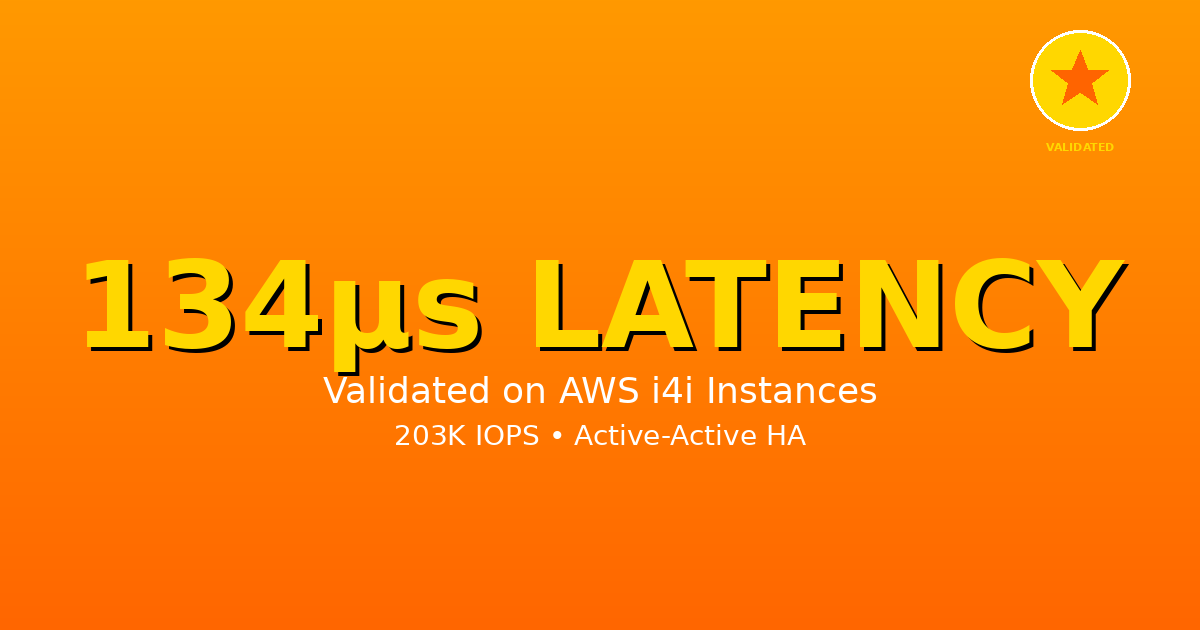
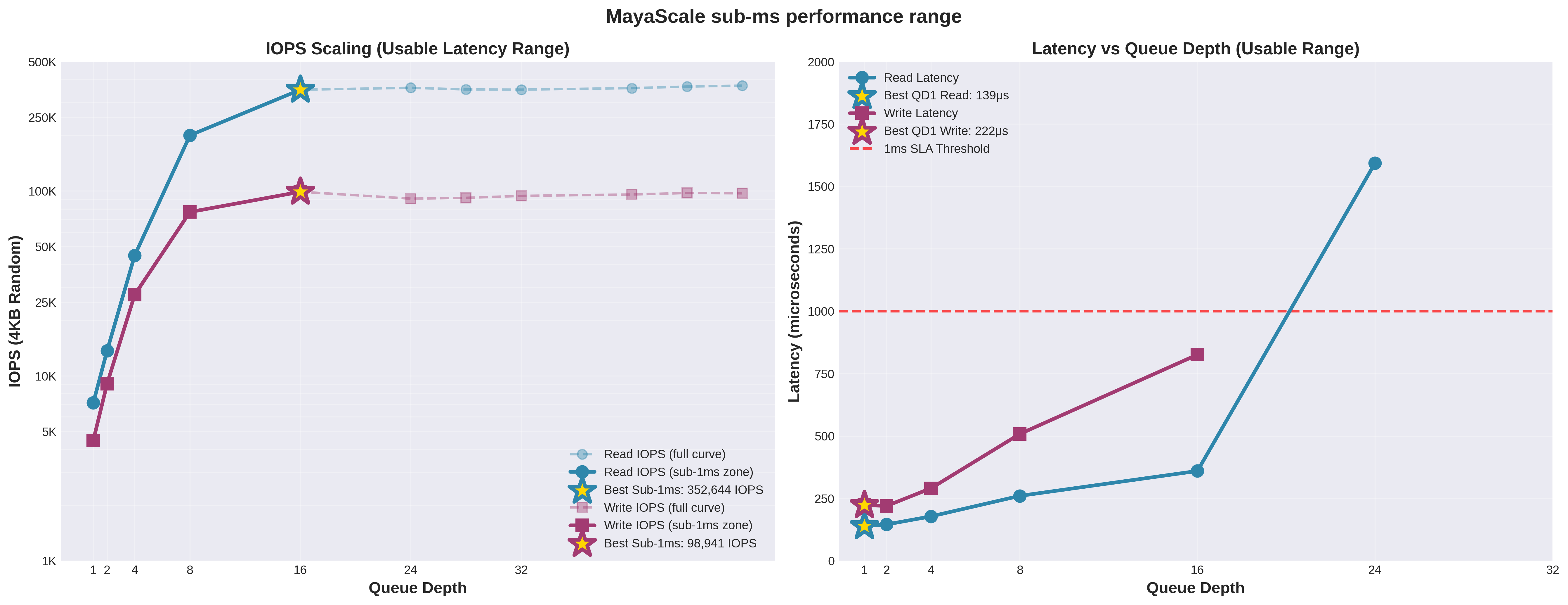
- 134μs read latency (QD1, validated Oct 2025)
- 186μs write latency (QD2, validated Oct 2025)
- 203K read IOPS @ sub-1ms latency
AWS i3en.6xlarge (High Tier)
- ~250μs latency (validated Nov 2025)
- 992K read IOPS (validated)
- 368K write IOPS (validated)
GCP n2-highcpu-64 (Ultra Tier)
- 192μs read latency (QD1, validated Nov 2025)
- 246μs write latency (QD4, validated Nov 2025)
- 2.3M read IOPS (validated)
- 866K write IOPS (validated)
Testing methodology: FIO with libaio engine, 4KB blocks, direct I/O, 30-second runtime per test.
No asterisks. No "up to" disclaimers. No hidden queue depth tricks. These are real numbers from real deployments.
Deployment: Choose Your Path
MayaScale is available through two deployment methods:
Cloud Marketplace (Coming Soon)
One-click deployment from AWS Marketplace, GCP Marketplace, or Azure Marketplace with:
- Pre-configured Active-Active HA
- Automatic billing through your cloud account
- Production-ready in under 15 minutes
Terraform Modules (Available Now)
Developer-friendly infrastructure as code:
- Policy-based tier selection (
aws-zonal-standard,gcp-ultra, etc.) - Multi-cloud consistency
- GitOps-ready workflows
- Full control over configuration
Both paths deliver the same architecture and performance—choose based on your deployment preferences.
Generic Comparison: MayaScale vs Traditional Enterprise Storage
| Feature | MayaScale | Traditional Enterprise Storage |
|---|---|---|
| Architecture | Server-side RAID-1 | Proprietary replication/erasure coding |
| Data plane protocol | Standard NVMe-oF (RFC 8985) | Often proprietary |
| Client requirements | Linux NVMe-oF initiator | Vendor-specific agents/drivers |
| Inline services | None (maximum performance) | Dedup, compression, tiering, etc. |
| Deployment | Terraform or Marketplace | GUI wizards or manual configuration |
| Troubleshooting | Standard Linux tools | Vendor-specific tools |
| Pricing | Transparent tiers | Often opaque "contact sales" |
| Latency | 134-250μs (validated) | Varies by feature configuration |
| Vendor lock-in | None (open standards) | High (proprietary stack) |
Key Architectural Differences
MayaScale Philosophy
"Use proven technologies (Linux RAID, NVMe-oF), automate deployment (Terraform/Marketplace), optimize for raw performance (no inline features), embrace open standards."
Traditional Enterprise Storage Philosophy
"Add every possible feature, use proprietary technology for differentiation, require vendor-specific clients, optimize for feature completeness over simplicity."
Neither is inherently wrong—they target different use cases. MayaScale optimizes for cloud-native deployments, performance-critical workloads, infrastructure as code workflows, and teams that prefer open standards.
Traditional enterprise storage optimizes for on-premises deployments, feature-rich environments, organizations with established vendor relationships, and workloads where inline services (dedup/compression) provide clear value.
Choose the architecture that matches your priorities.
Conclusion: Simplicity at Scale
MayaScale proves that cloud storage doesn't need to be complex. With proven technologies (Linux RAID-1, standard NVMe-oF) and modern deployment automation (Terraform or Marketplace), you can have:
- Sub-millisecond latency
- Active-Active high availability
- Infrastructure as code
- Open standards (no vendor lock-in)
- Transparent pricing and performance
No proprietary protocols. No inline features adding latency. No complex configuration matrices.
Just simple, fast, reliable shared storage that you can deploy, understand, and troubleshoot with standard Linux tools.
Ready to Try the Simple Approach?
Deploy MayaScale via Terraform or Marketplace. Get validated sub-millisecond performance with Active-Active HA.
Download Terraform Modules Contact Sales