...
Objbaker service startup fails to mount the configured cloud object storage due to unclean shutdown
Solution
| Panel |
|---|
|
- Start If needed start the Crossmeta drivers and make sure it is available in read-write mode. If not root file system check is required which can be performed as follows from Administrator Command Prompt
c:\program files\crossmeta\service_crossmeta start
c:\program files\crossmeta\service_crossmeta check
- Check syslog messages files in v:\var\log\syslog to identify potential problems. If the objbaker is reporting that the object storage appears to be mounted because a clean shutdown was not possible earlier, then it is required to reset-mounted-flag manually only if its not really mounted on a different computer.
To run the command manually query the service to get the command line | Code Block |
|---|
| >sc qc objdisk1
[SC] QueryServiceConfig SUCCESS
SERVICE_NAME: objdisk1
TYPE : 10 WIN32_OWN_PROCESS
START_TYPE : 2 AUTO_START (DELAYED)
ERROR_CONTROL : 1 NORMAL
BINARY_PATH_NAME : "c:\program files\crossmeta\objbacker.exe" --cacert="c:\program files\crossmeta\ca-bundle.crt" --accessFile=/etc/.s3azure_passwd --s3Type=azure --baseURL=https://zfstest.blob.core.windows.net/ --directIO --noAutoDetect --size=10T --timeout=30 --blockCacheSize=100 --blockCacheThreads=8 --minWriteDelay=5000 --md5CacheSize=1000000 --ssl --blockSize=1024K -o no_pagecache --filename=file.vhdx disk1 /mnt
LOAD_ORDER_GROUP :
TAG : 0
DISPLAY_NAME : My first object disk disk1 from Azure
DEPENDENCIES : cxfuse
SERVICE_START_NAME : LocalSystem |
- Copy and paste the BINARY_PATH_NAME value and add -f option to run interactively and confirm the problem
| Code Block |
|---|
| V:\>"c:\program files\crossmeta\objbacker.exe" --cacert="c:\program files\crossmeta\ca-bundle.crt" --accessFile=/etc/.s3azure_passwd --s3Type=azure --baseURL=https://zfstest.blob.core.windows.net/ --directIO --noAutoDetect --size=10T --timeout=30 --blockCacheSize=100 --blockCacheThreads=8 --minWriteDelay=5000 --md5CacheSize=1000000 --ssl --blockSize=1024K -o no_pagecache --filename=file.vhdx disk1 /mnt -f
objbacker.exe: auto-detection disabled; using configured block size 1m and file size 10t
objbacker.exe: error: https://zfstest.blob.core.windows.net/disk1/ appears to be already mounted
|
Reset the mounted flag as follows | Code Block |
|---|
| V:\>"c:\program files\crossmeta\objbacker.exe" --cacert="c:\program files\crossmeta\ca-bundle.crt" --accessFile=/etc/.s3azure_passwd --s3Type=azure --baseURL=https://zfstest.blob.core.windows.net/ --directIO --noAutoDetect --size=10T --timeout=30 --blockCacheSize=100 --blockCacheThreads=8 --minWriteDelay=5000 --md5CacheSize=1000000 --ssl --blockSize=1024K -o no_pagecache --filename=file.vhdx disk1 --reset-mounted-flag
objbacker.exe: auto-detection disabled; using configured block size 1m and file size 10t
objbacker.exe: resetting mounted flag for https://zfstest.blob.core.windows.net/disk1/
objbacker.exe: done
Launch vfsadm Administration console and navigate to
Cloud disks → services and select the service name and right-click to perform Reset-Mounted option
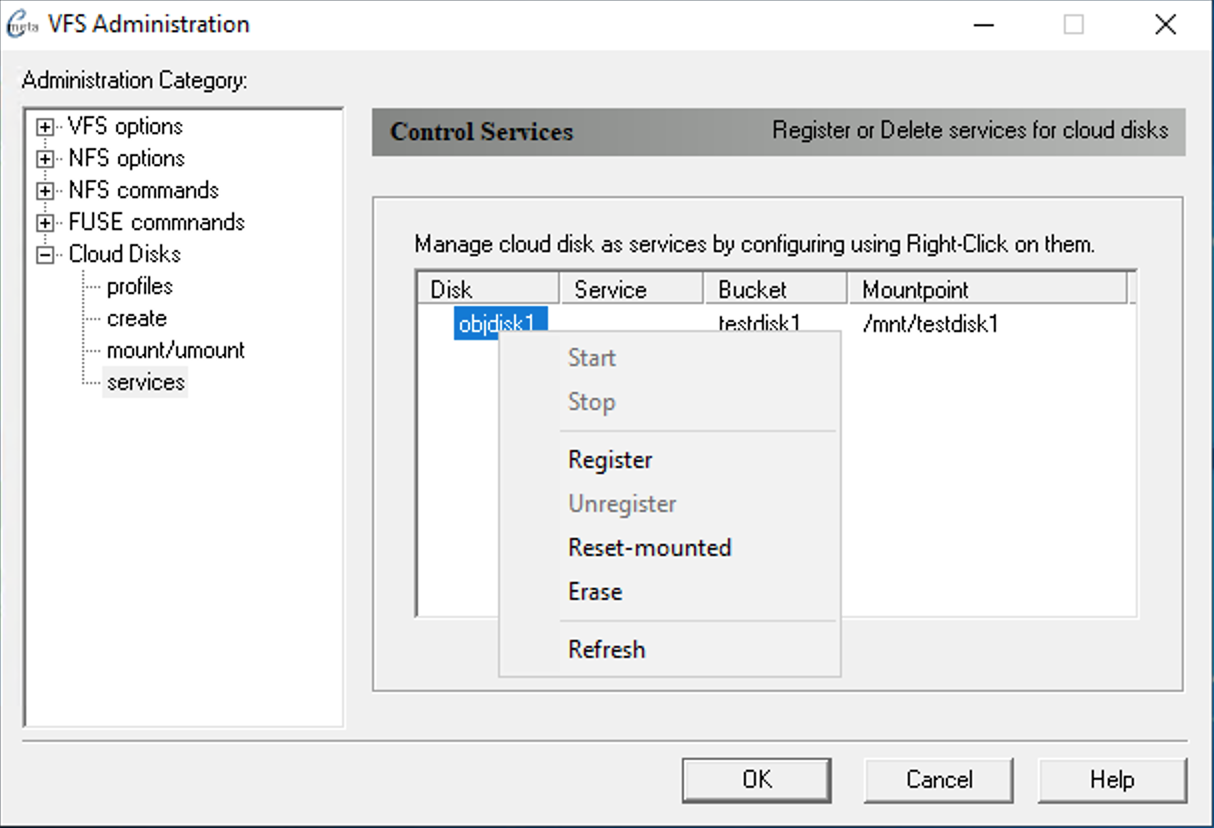 Image Added Image Added
Try to Start service after Reset-mounted completed successfully.
|
Related articles
| Content by Label |
|---|
| showLabels | false |
|---|
| max | 5 |
|---|
| spaces | MFG |
|---|
| showSpace | false |
|---|
| sort | modified |
|---|
| reverse | true |
|---|
| type | page |
|---|
| cql | label in ("service","mount","reset-mounted","objbaker") and type = "page" and space = "MFG" |
|---|
| labels | objbaker service mount reset-mounted |
|---|
|
...
