...
Objbaker service startup fails to mount the configured cloud object storage due to unclean shutdown
Solution
| Panel |
|---|
|
- Start If needed start the Crossmeta drivers and make sure it is available in read-write mode. If not root file system check is required which can be performed as follows from Administrator Command Prompt
c:\program files\crossmeta\service_crossmeta start
c:\program files\crossmeta\service_crossmeta check
- Check syslog messages files in v:\var\log\syslog to identify potential problems. If the objbaker is reporting that the object storage appears to be mounted because a clean shutdown was not possible earlier, then it is required to reset-mounted-flag manually only if its not really mounted on a different computer.
c:\program files\crossmeta\objbacker --reset-mounted-flag
Launch vfsadm Administration console and navigate to
Cloud disks → services and select the service name and right-click to perform Reset-Mounted option
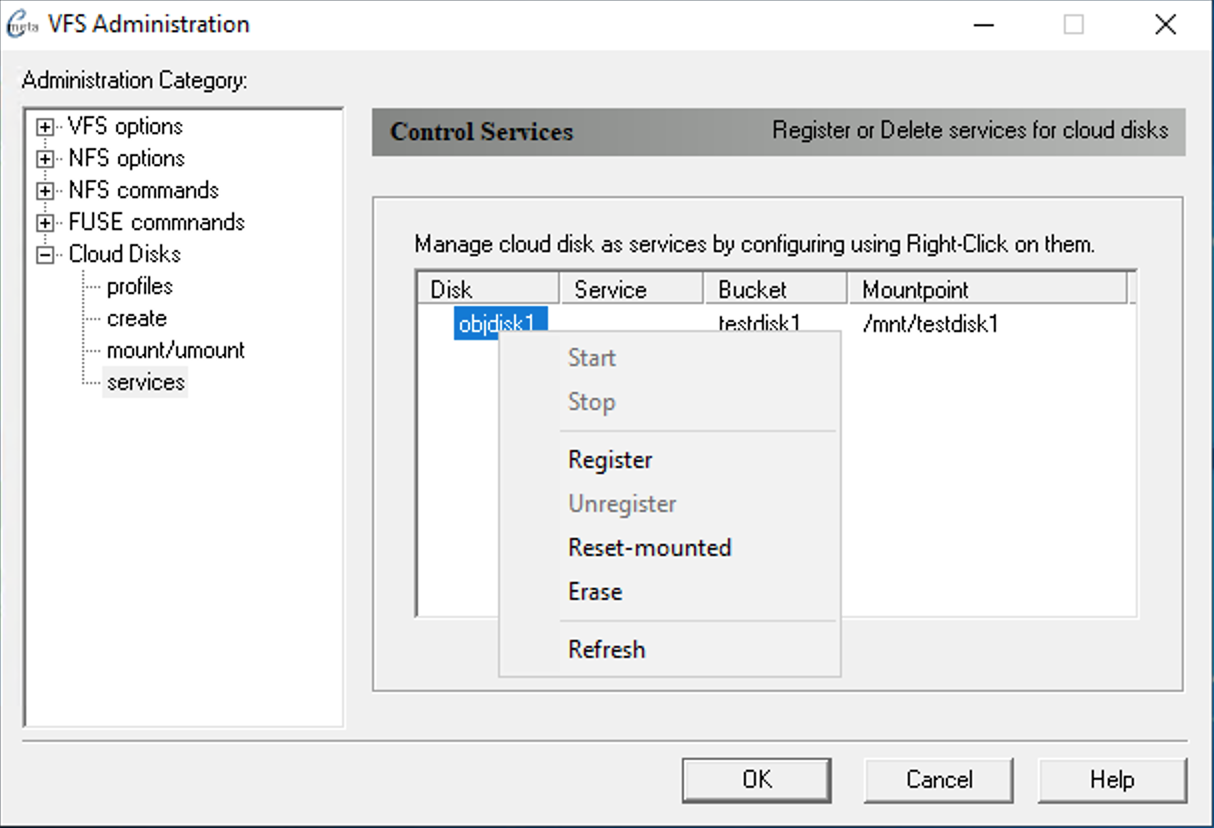 Image Added Image Added
Try to Start service after Reset-mounted completed successfully.
|
Related articles
| Content by Label |
|---|
| showLabels | false |
|---|
| max | 5 |
|---|
| spaces | MFG |
|---|
| showSpace | false |
|---|
| sort | modified |
|---|
| reverse | true |
|---|
| type | page |
|---|
| cql | label in ("service","mount","reset-mounted","objbaker") and type = "page" and space = "MFG" |
|---|
| labels | objbaker service mount reset-mounted |
|---|
|
...
